Adafruit DPI TFT Kippah for Raspberry Pi
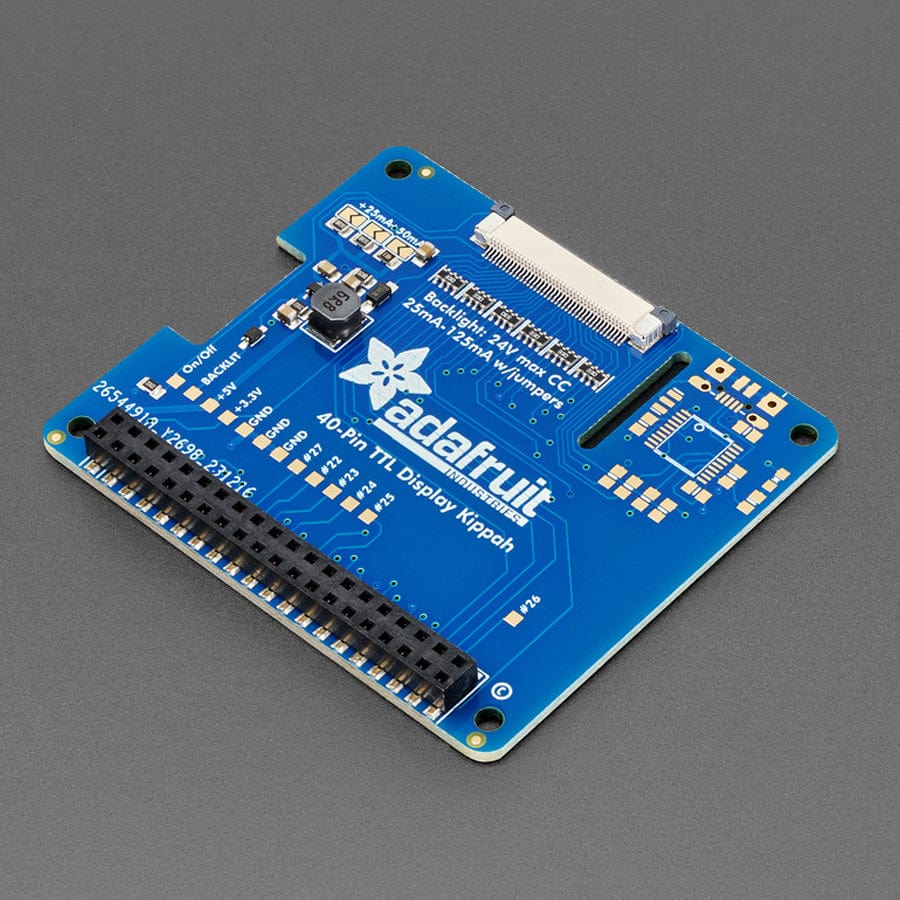
The Adafruit DPI Kippah for Raspberry Pi (No Touchscreen) lets you connect a 5" or 7" TFT directly to your Pi’s GPIO — no HDMI decoder needed! It delivers fast, full-colour 18-bit video with native graphics acceleration and generates its own backlight voltage from the Pi’s 5 V power.
This is the Kippah with no touchscreen support. We have a version with touchscreen capabilities if that's your thing!
Compared to our lovely HDMI backpacks, you don't have the extra cost or expense of an HDMI encoder/decoder. And you get a nice ultra-fast 18-bit colour display with optional touch support. We tested it, and it works great with our 5" and 7" displays at 800x480. This display is 'native' so it gets all the graphics acceleration capabilities, instant refresh, etc. you would get from an HDMI display. The Kippah will also generate the backlight drive voltage (up to ~24V) from the 5V USB power on the Raspberry Pi
OK so, exciting right? But, what's the catch? The catch is this add-on board uses nearly every pin available on the Raspberry Pi and those pins are hardcoded, they cannot be moved or rearranged. The pins used are GPIO 2 through 21 inclusive. That means you don't get the UART RX/TX pins (no console cable) and you don't get the standard user I2C pins, the EEPROM I2C pins, or hardware SPI pins. You do get to use pins #22, #23, #24, #25, #26 and #27, and the USB ports are fine to use too.
The other catch is that this display replaces the HDMI/NTSC output, so you can't have the DPI HAT and HDMI working at once, nor can you 'flip' between the two. Also, there's no PWM's available so you can't have precision backlight control unless you somehow rig up an external PWM generator with a 555 or something.
Finally, we did test this setup with a straight-up Raspbian and after the software installs, it works great. However, we don't guarantee it will work with any other Raspberry Pi operating system or setup.
The Adafruit DPI Kippah for Raspberry Pi (No Touchscreen) lets you connect a 5" or 7" TFT directly to your Pi’s GPIO — no HDMI decoder needed! It delivers fast, full-colour 18-bit video with native graphics acceleration and generates its own backlight voltage from the Pi’s 5 V power.
That said, if you don't need all the Pi GPIO, it's very easy to add a high quality display. Pick and choose whether you want a touch-screen or not, then choose the size of the display - 5" or 7" is best. You can also grab an FPC extension board and extend the display away from the Pi. For power-users, this is a very nice little accessory
Comes as one fully assembled and tested DPI Kippah circuit board. You may need a soldering iron to adjust the backlight by soldering closed a PCB jumper (check the tutorial on this).
TFT display, USB micro-B cable, FPC extension cable, bent wire stand, and Raspberry Pi not included.
Specifications
- 56mm x 65mm x 5.5mm
- Weight: 14.8g
Resources
Revision History
-
- As of April 16, 2025 We added a new backlight controller and updated the PCB with Adafruit Pinguin to make a lovely and legible silkscreen. You may get the new PCB or the older version with vector fonts.
Package Contents
- 1x Adafruit DPI TFT Kippah for Raspberry Pi
The Adafruit DPI Kippah for Raspberry Pi (No Touchscreen) lets you connect a 5" or 7" TFT directly to your Pi’s GPIO — no HDMI decoder needed! It delivers fast, full-colour 18-bit video with native graphics acceleration and generates its own backlight voltage from the Pi’s 5 V power.
This is the Kippah with no touchscreen support. We have a version with touchscreen capabilities if that's your thing!
Compared to our lovely HDMI backpacks, you don't have the extra cost or expense of an HDMI encoder/decoder. And you get a nice ultra-fast 18-bit colour display with optional touch support. We tested it, and it works great with our 5" and 7" displays at 800x480. This display is 'native' so it gets all the graphics acceleration capabilities, instant refresh, etc. you would get from an HDMI display. The Kippah will also generate the backlight drive voltage (up to ~24V) from the 5V USB power on the Raspberry Pi
OK so, exciting right? But, what's the catch? The catch is this add-on board uses nearly every pin available on the Raspberry Pi and those pins are hardcoded, they cannot be moved or rearranged. The pins used are GPIO 2 through 21 inclusive. That means you don't get the UART RX/TX pins (no console cable) and you don't get the standard user I2C pins, the EEPROM I2C pins, or hardware SPI pins. You do get to use pins #22, #23, #24, #25, #26 and #27, and the USB ports are fine to use too.
The other catch is that this display replaces the HDMI/NTSC output, so you can't have the DPI HAT and HDMI working at once, nor can you 'flip' between the two. Also, there's no PWM's available so you can't have precision backlight control unless you somehow rig up an external PWM generator with a 555 or something.
Finally, we did test this setup with a straight-up Raspbian and after the software installs, it works great. However, we don't guarantee it will work with any other Raspberry Pi operating system or setup.
The Adafruit DPI Kippah for Raspberry Pi (No Touchscreen) lets you connect a 5" or 7" TFT directly to your Pi’s GPIO — no HDMI decoder needed! It delivers fast, full-colour 18-bit video with native graphics acceleration and generates its own backlight voltage from the Pi’s 5 V power.
That said, if you don't need all the Pi GPIO, it's very easy to add a high quality display. Pick and choose whether you want a touch-screen or not, then choose the size of the display - 5" or 7" is best. You can also grab an FPC extension board and extend the display away from the Pi. For power-users, this is a very nice little accessory
Comes as one fully assembled and tested DPI Kippah circuit board. You may need a soldering iron to adjust the backlight by soldering closed a PCB jumper (check the tutorial on this).
TFT display, USB micro-B cable, FPC extension cable, bent wire stand, and Raspberry Pi not included.
Specifications
- 56mm x 65mm x 5.5mm
- Weight: 14.8g
Resources
Revision History
-
- As of April 16, 2025 We added a new backlight controller and updated the PCB with Adafruit Pinguin to make a lovely and legible silkscreen. You may get the new PCB or the older version with vector fonts.
Package Contents
- 1x Adafruit DPI TFT Kippah for Raspberry Pi
Original: $13.40
-65%$13.40
$4.69Description
The Adafruit DPI Kippah for Raspberry Pi (No Touchscreen) lets you connect a 5" or 7" TFT directly to your Pi’s GPIO — no HDMI decoder needed! It delivers fast, full-colour 18-bit video with native graphics acceleration and generates its own backlight voltage from the Pi’s 5 V power.
This is the Kippah with no touchscreen support. We have a version with touchscreen capabilities if that's your thing!
Compared to our lovely HDMI backpacks, you don't have the extra cost or expense of an HDMI encoder/decoder. And you get a nice ultra-fast 18-bit colour display with optional touch support. We tested it, and it works great with our 5" and 7" displays at 800x480. This display is 'native' so it gets all the graphics acceleration capabilities, instant refresh, etc. you would get from an HDMI display. The Kippah will also generate the backlight drive voltage (up to ~24V) from the 5V USB power on the Raspberry Pi
OK so, exciting right? But, what's the catch? The catch is this add-on board uses nearly every pin available on the Raspberry Pi and those pins are hardcoded, they cannot be moved or rearranged. The pins used are GPIO 2 through 21 inclusive. That means you don't get the UART RX/TX pins (no console cable) and you don't get the standard user I2C pins, the EEPROM I2C pins, or hardware SPI pins. You do get to use pins #22, #23, #24, #25, #26 and #27, and the USB ports are fine to use too.
The other catch is that this display replaces the HDMI/NTSC output, so you can't have the DPI HAT and HDMI working at once, nor can you 'flip' between the two. Also, there's no PWM's available so you can't have precision backlight control unless you somehow rig up an external PWM generator with a 555 or something.
Finally, we did test this setup with a straight-up Raspbian and after the software installs, it works great. However, we don't guarantee it will work with any other Raspberry Pi operating system or setup.
The Adafruit DPI Kippah for Raspberry Pi (No Touchscreen) lets you connect a 5" or 7" TFT directly to your Pi’s GPIO — no HDMI decoder needed! It delivers fast, full-colour 18-bit video with native graphics acceleration and generates its own backlight voltage from the Pi’s 5 V power.
That said, if you don't need all the Pi GPIO, it's very easy to add a high quality display. Pick and choose whether you want a touch-screen or not, then choose the size of the display - 5" or 7" is best. You can also grab an FPC extension board and extend the display away from the Pi. For power-users, this is a very nice little accessory
Comes as one fully assembled and tested DPI Kippah circuit board. You may need a soldering iron to adjust the backlight by soldering closed a PCB jumper (check the tutorial on this).
TFT display, USB micro-B cable, FPC extension cable, bent wire stand, and Raspberry Pi not included.
Specifications
- 56mm x 65mm x 5.5mm
- Weight: 14.8g
Resources
Revision History
-
- As of April 16, 2025 We added a new backlight controller and updated the PCB with Adafruit Pinguin to make a lovely and legible silkscreen. You may get the new PCB or the older version with vector fonts.
Package Contents
- 1x Adafruit DPI TFT Kippah for Raspberry Pi